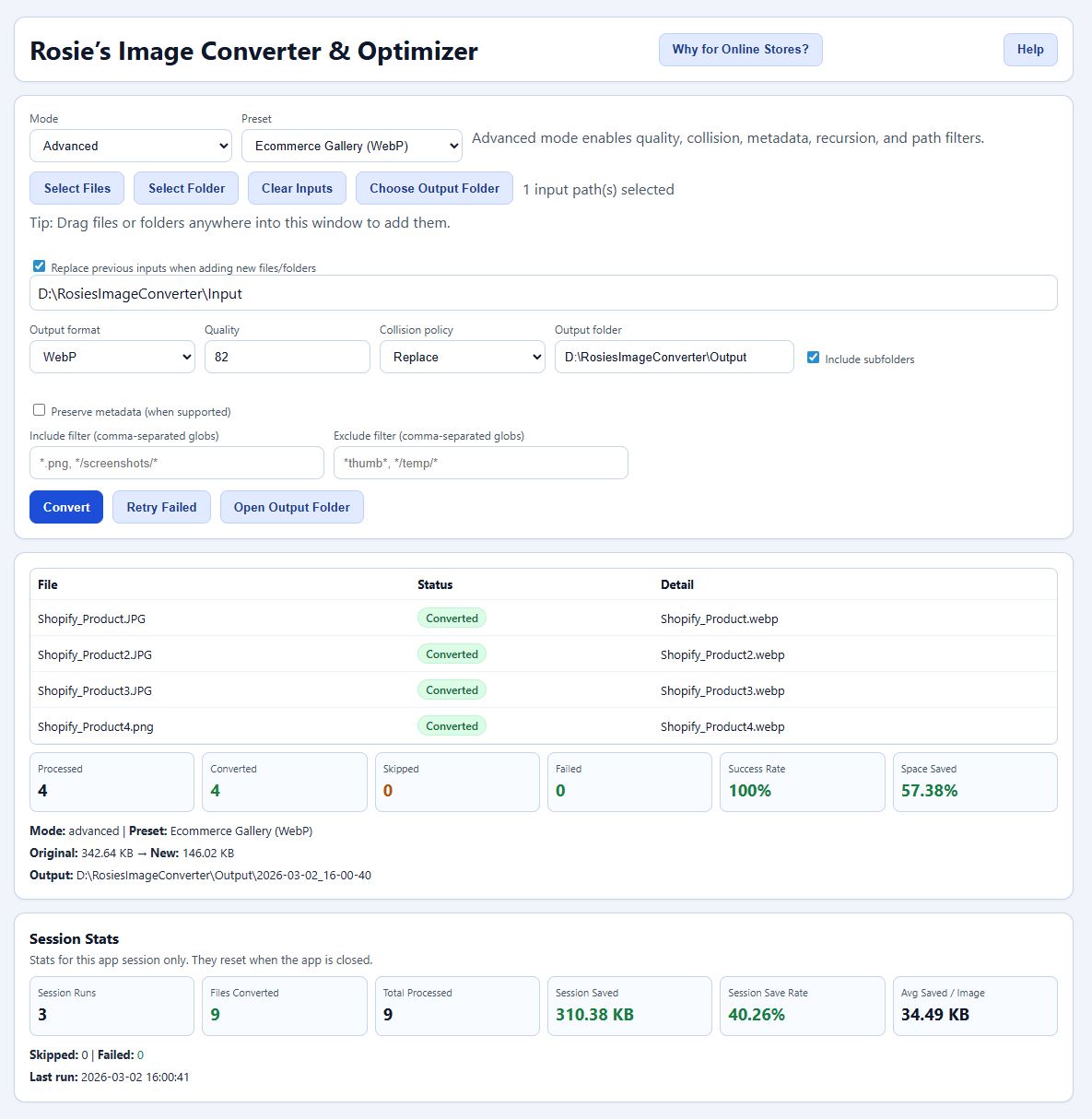
Rosie's Image Converter & Optimizer (No Subscription)
Rosie's Image Converter & Optimizer (No Subscription)
Couldn't load pickup availability
Instant Delivery
Instant Delivery
This is a digital product. After checkout, your download link and access instructions are delivered immediately by email and are also available from your order confirmation page.
License & Usage
License & Usage
Your purchase includes a personal-use digital license unless otherwise stated in the product description. Please do not redistribute, resell, or share files. For commercial licensing, contact us before purchase.
System Requirements
System Requirements
Please review the product description for platform compatibility, required software versions, and file formats before purchase. If you are unsure whether this product will work for your setup, contact us and we’ll help confirm compatibility.
Refunds & Support
Refunds & Support
Because digital products are delivered instantly, refunds are generally not available after download/access is granted. If you have trouble accessing your files or encounter a product issue, contact us at info@rosiesstore.net and we’ll make it right.
Current Version: v1.0.0 Compatibility: Windows 10 & Windows 11 (64-bit only)
Stop paying monthly fees to convert your own images.
Rosie's Image Converter is the powerful, private, and permanent solution for developers, store owners, and creators. Whether you need to optimize 5,000 product photos for your website or convert PNGs to WEBP files for your next project, do it securely on your own machine without uploading your files to a slow, unknown server.
Why Choose Rosie's Converter?
-
Pay Once, Keep it Forever: Say goodbye to monthly subscriptions. You get the full software for a single, affordable price. No hidden fees, no "pro" tiers, and no credit cards on file.
-
100% Private & Offline: Your photos never leave your computer. Unlike online converters that process data in the cloud, Rosie's Converter runs locally on your PC. Perfect for sensitive client work.
-
Unlimited Batch Processing: Drag and drop 1 image or 10,000. There are no daily limits or file size caps. Performance depends on your computer's hardware.
-
Local Speed: Harness the full power of your own CPU. Stop waiting for files to upload and download, process them as fast as your hardware allows.
Key Features:
-
Bulk Conversion: Convert entire folders of JPGs to WebP, PNG to JPG, and more.
-
Web Optimization: Drastically reduce file sizes for faster loading speeds (ideal for Shopify, WordPress, and Etsy).
-
Drag & Drop: Simple, no-nonsense interface.
-
Visual Feedback: See your file size savings summary after every run.
-
Windows Native: Built specifically for Windows 10 & 11.
Technical & Support Information
⚠️ Important Installation Note (SmartScreen): Because this is a niche tool from an indie developer (and not a giant corporation), Windows Defender SmartScreen may flag it as an "unrecognized app" on the very first launch. This is normal.
-
To Run: Click "More Info" → "Run Anyway."
-
This only happens once. Your data remains 100% safe.
Getting Started:
-
Put the .zip file you downloaded into the folder you'd like to use for the app.
- Next, unzip the .zip file into the folder.
- Then, review the .txt files in the folder and run the RosiesImageConverter.exe
- You are now ready to explore and use the program.
System Requirements:
-
Windows 10 or Windows 11
-
64-bit Processor
-
Not compatible with macOS or Linux at this time.
File Verification (SHA256): To verify your download is authentic and unmodified, compare your file’s SHA256 hash with the official value below:
-
File:
RosiesImageConverter.exe -
Hash:
E81A8CF5FE5DACD06AF808695EB38EB1B58674697E562B986D5F6AD967332EDA
License & Support:
-
License: Single User License. You may install and use this on multiple personal computers (e.g., your desktop and laptop), but you may not share the file.
-
Support: Need help? Email us at info@rosiesstore.net